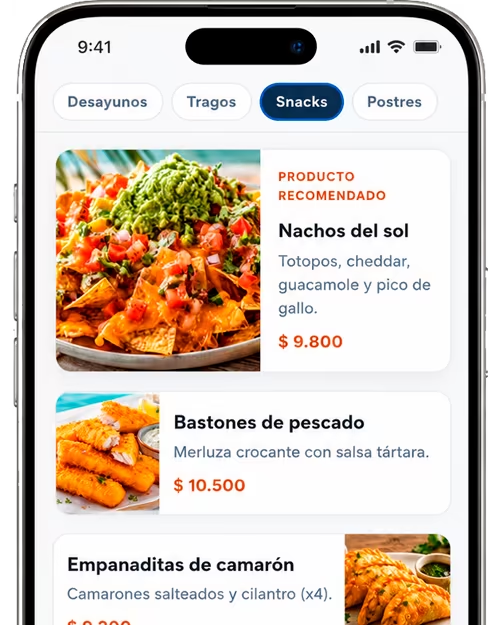
Better dining-room experience
Guests check dishes and prices in seconds on their phone, with clear text, photos, and visible allergens—no downloads or counter waits.
AppMenuQR is restaurant QR menu software that centralizes your digital menu: manage dishes and categories, publish updates in real time, and share a QR code so guests browse the menu on their phone—without apps or constant reprints.
✓ Free QR menu
✓ PRO QR menu (extra features)
✓ No credit card required
✓ Set up in minutes
✓ Support included
Everything you need to run a professional QR code menu from one dashboard.
Organize sections, dishes, prices, allergens, and descriptions with a panel built for day-to-day restaurant operations.
Change your digital menu instantly. Guests always see the latest version—no need to reprint QR codes or paper menus.
Hide out-of-stock or seasonal items and bring them back when they’re available again.
Generate a restaurant QR menu ready for tables, counters, delivery, or social. One link, always up to date.
Serve local and international guests with a multi-language menu according to your plan.
Templates that match your brand—from casual spots to restaurants that need a more polished digital menu.
Digitize the dining experience without reprinting every time you change a price or dish. AppMenuQR combines a digital restaurant menu, product management, and a QR code in an easy-to-use hospitality SaaS platform.
Choose the product limits, languages, and customization your business needs. Start on the free plan and upgrade as you grow.
Try your digital menu
Ideal to set up your digital menu and QR code with no upfront commitment.
More products and control as your digital menu grows.
USD 41.88/yr17% offUSD 34.9/yr
Photos, languages, and Pro templates for a fuller digital menu.
USD 95.88/yr17% offUSD 79.9/yr
Custom design and setup to adapt your digital menu to your business needs.
Tell us what you need
In a few steps you go from a paper menu to a cloud-managed restaurant digital menu:
Keep your restaurant QR menu current without reprinting materials.
Beyond the QR code, what matters is how your team runs the menu every day: less friction, more control, and a better experience for guests dining in or checking the menu before they arrive.
Guests check dishes and prices in seconds on their phone, with clear text, photos, and visible allergens—no downloads or counter waits.
Cut reprints every time you adjust the menu. A well-managed digital restaurant menu saves paper and staff time over the long run.
Change prices, add dishes, or hide out-of-stock items. Updates show immediately on your digital QR menu.
Present a digital menu aligned with your brand. Ideal if you want to look current—using a restaurant QR menu as a complement, not the only message.
A digital menu customers open on their phone by scanning a QR code. They can browse dishes, prices, and allergens in the browser—no app install. You manage the menu from a web dashboard with real-time updates.
No. Your QR menu opens in the mobile browser. Guests scan the code on the table, printed menu, or sign and see the menu instantly.
Yes. AppMenuQR is restaurant menu software that lets you edit categories, dishes, and prices whenever you need. Changes go live immediately—without reprinting the QR code.
Yes. Temporarily disable dishes and turn them back on in seconds so your digital menu always matches what’s available in the kitchen.
Yes. It’s built for restaurants, bars, cafés, food trucks, and hospitality venues that want a professional QR code menu that’s easy to maintain.
Yes. Offer a multilingual digital menu for international guests. Multi-language menus are available on Pro plans and above.
You can sign up and set up your digital QR menu on a free starter plan. Upgrade when you need more products, languages, or customization.
On tables, reservations, printed menus, windows, social media, or messaging apps. The same QR code keeps working when you update dishes or prices.
Yes. From the admin panel you can generate a printable menu: choose restaurant, language, and menus, then print for the dining room, patio, or events.
Create multiple menus (for example lunch, dinner, or a special) and, on Pro or Premium plans, schedule which days and hours each one is shown for your restaurant’s timezone. Guests scanning the QR see the right menu at the right time—without changing the code.
Centralize menu management, publish real-time updates, and offer guests a professional digital menu from day one.
No credit card • Set up in minutes • Cancel anytime