The way guests read a restaurant menu has changed. QR codes on tables, counters, and printed menus now let people open the products directly on a phone.
A dynamic QR menu offers more than a different way to show the menu.
Besides making products easier to open, it lets you update prices in seconds, hide sold-out items in real time, customize the design without a designer, and switch menus automatically.
For restaurants, bars, and cafés, these tools can save a lot of time and make the daily service easier to run.
This article covers the 7 main benefits of a dynamic QR menu, how it works, and why it can help your business.
What is a dynamic QR menu and how does it work?
A dynamic QR menu is a digital menu you can update — products, prices, and descriptions — without replacing the QR code guests already use.
The flow is simple. The restaurant builds the digital menu and shares it with a QR code. A guest scans it with the phone camera and opens the menu in the browser, with no app to install.
Unlike a printed menu or a regular PDF, a dedicated platform lets you manage the content from an admin panel in real time.
If you need to change a burger price, add a drink, or hide a sold-out dish, you can do it from a computer or a phone. See Dynamic QR menu and Manage products.
Changes show up on the digital menu immediately. You do not edit the QR code already on the tables, and you do not wait for a designer or a technician — or pay for that extra work.
With a platform like App Menu QR, you can create and manage the digital menu without coding or design skills.
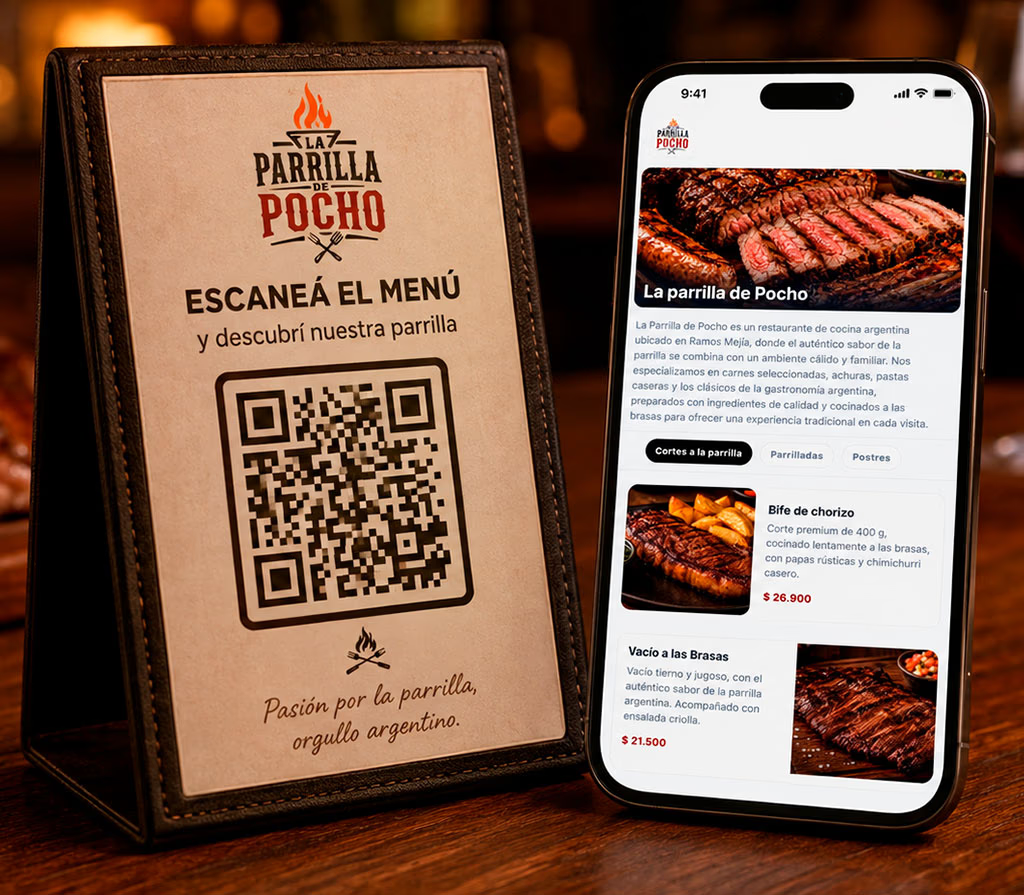
What are the 7 main benefits of a dynamic QR menu?
The main benefits are updating products in real time, printing less, hiding sold-out items instantly, a clearer phone experience, a custom design without technical skills, prices that stay in sync across languages, and menus that switch on a schedule.
Here is how to use each one.
1. Update prices and products in real time, without a designer
One of the biggest advantages is that you can change the menu in seconds and see the update right away.
Traditionally, a price change, a new dish, or a new description meant contacting a designer, waiting for a new file, and publishing it again.
With App Menu QR, that process is much shorter.
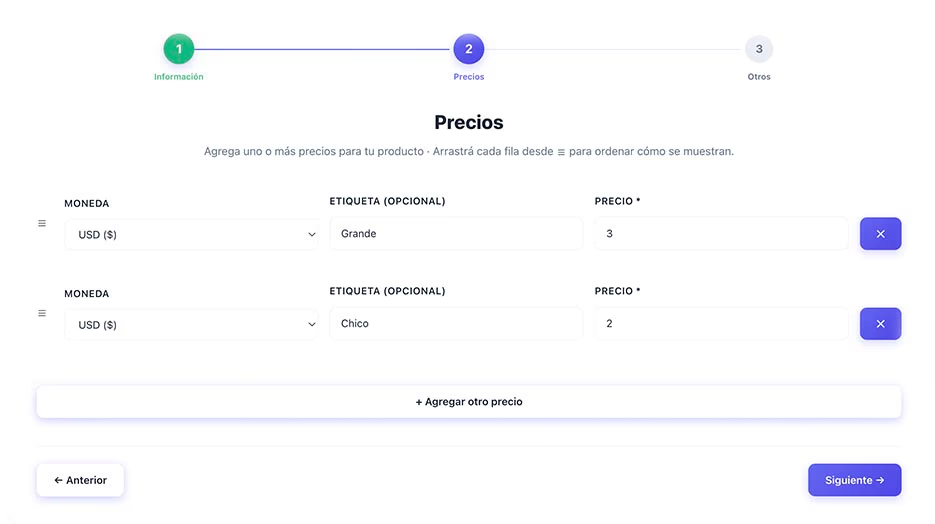
From the admin panel you select any product, change the price, update the description, or add new options. See Dynamic QR menu.
The digital menu updates on its own. You do not export a file or upload it to a web server.
You do not need technical skills, and you do not depend on someone else to keep the menu current.
If a pizza price changes, you can update it in a few seconds. The next guest who opens the menu on a phone sees the new price.
The QR code already on the tables stays the same.
The restaurant keeps control of the menu and can change it at any time, without extra waiting.
2. Spend less on printing without giving up paper menus
Every time prices change or new dishes are added, the venue may need to print the menus again.
If those changes are frequent, printing becomes an extra cost.
With a dynamic QR menu, guests can read the current information on a phone, so you print new versions less often.
One point matters: a digital menu does not mean you have to stop using printed menus.
Many venues keep both, for different reasons:
- Some guests are more comfortable with a traditional menu.
- A printed version helps when there is no connection, or when a guest has no phone.
- Some venues need paper menus for operational or local rules.
- A printed menu can also be part of how the restaurant presents itself.
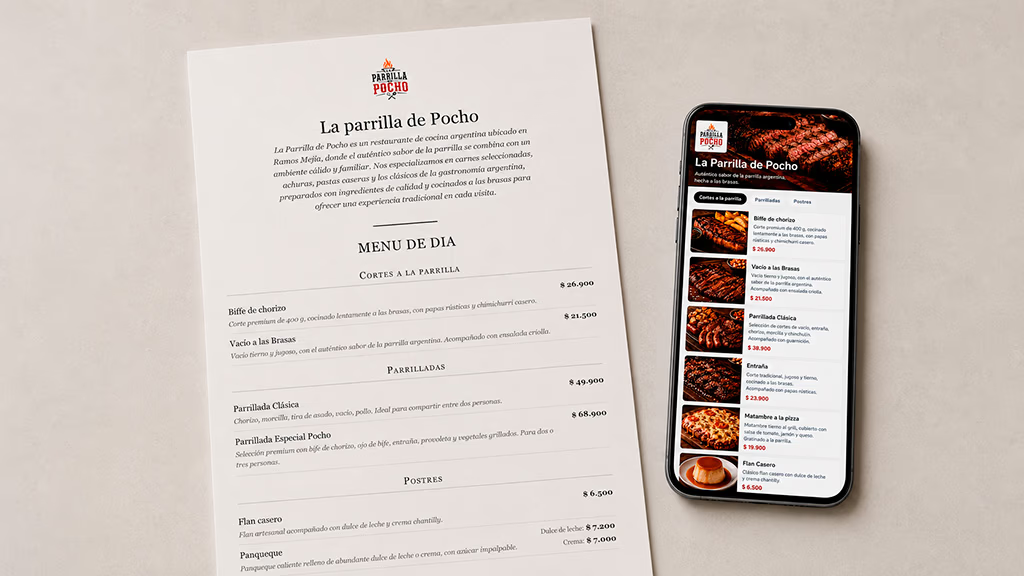
App Menu QR can generate a print-ready menu from the same products and prices as the digital menu. See Print menu.
You can choose how sections are laid out, for example starting each category on a new page or keeping them continuous. More detail is in Print menu.
You can offer a QR version and a printed version when you need both.
The benefit is choosing how to share the menu instead of depending on a single format.
3. Hide sold-out products in seconds and avoid mix-ups
This happens often in restaurants.
A product runs out during service, but it is still on the menu.
A new guest spends a few minutes reading the dishes and decides what to order.
When the server takes the order, they have to explain that the dish is gone.
The guest goes back to the menu and picks something else, while the staff spends extra time on the same table.
With App Menu QR you can avoid that by updating availability in real time.
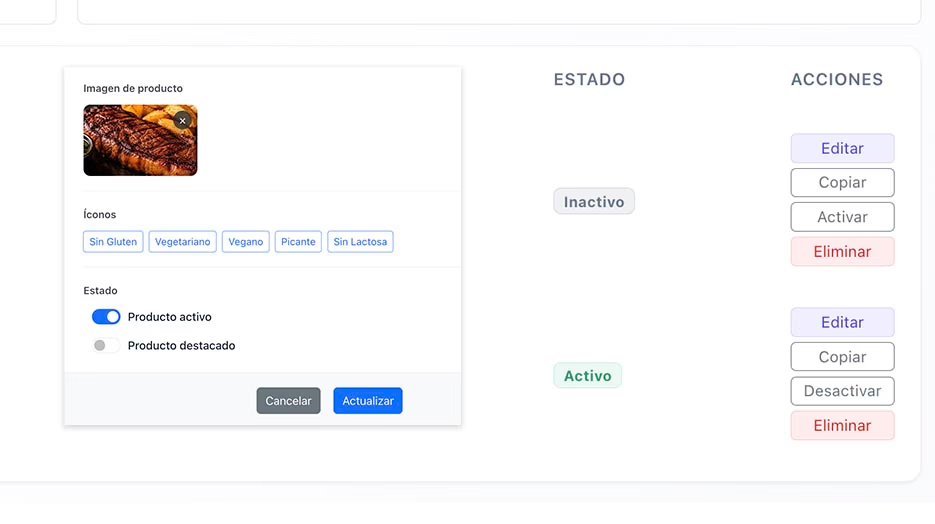
When a product sells out, open the panel, find it, and turn it off with one click. How to do it is in Manage products.
It disappears from the digital menu. When it is available again, you turn it back on the same way.
You do not delete it or enter the information again.
This is especially useful for businesses that work with:
- Fresh products that depend on availability.
- Dishes of the day.
- Seasonal preparations.
- Drinks or ingredients that run out for a while.
An up-to-date menu avoids confusion, speeds up service, and makes the visit easier for guests.
4. Make the menu easier to read on a phone
The menu is one of the main ways a restaurant talks to its guests.
The information should be clear, products should be organized, and prices should be easy to find.
A menu designed for phones can present products in categories and adapt navigation to a small screen. Categories are part of the dynamic QR menu.
For example, you can organize the menu into:
- Starters.
- Main courses.
- Burgers and pizzas.
- Drinks.
- Desserts.
Guests can move through those sections on a phone without constantly zooming, which is common with PDFs designed for print.
You can also add photos so dishes are easier to recognize. Photos are added when you manage products.
A practical example: a guest who only wants desserts can open that category without scrolling the whole menu.
Clear navigation and a layout made for phones can make the experience more comfortable.
To compare both formats, read QR menu vs. PDF: which is the better option for your restaurant?.
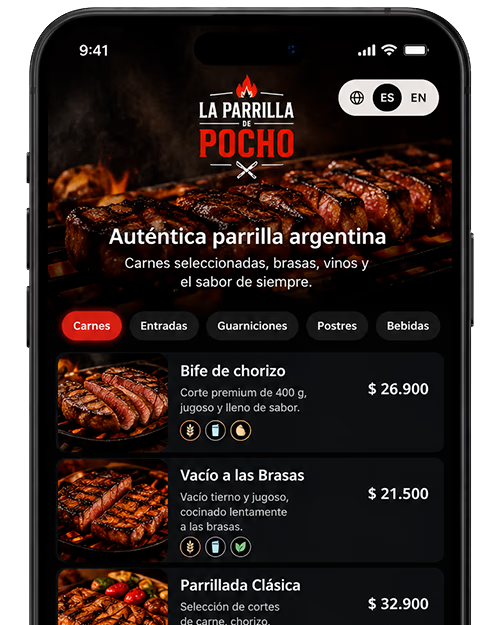
5. Design and customize the menu in a few minutes, without hiring a designer
An attractive restaurant menu does not have to be complicated, and it does not require graphic-design training.
With App Menu QR, anyone can create and customize a digital menu in a few minutes, even with no previous experience.
The platform offers templates you can adapt to the business. Browse the template catalog.
Customization options include:
- A choice of typefaces.
- Colors for different elements.
- Text size adjustments.
- Names for categories, products, and prices.
- Ways to highlight selected parts of the menu.
App Menu QR also includes a visual editor that makes the process easier. Fonts, sizes, and colors are covered in More customization options to design your digital menu.
You can see the menu while you design it, select elements from the preview, and change colors, typefaces, and other details in real time.
A practical example: a café can use soft colors and modern type, while a burger place can choose a bolder layout.
You do not need to hire a designer or learn a complex program. You can create the menu, customize it, and change it whenever you need to.
That gives you room to match the design to the business without depending on someone else.
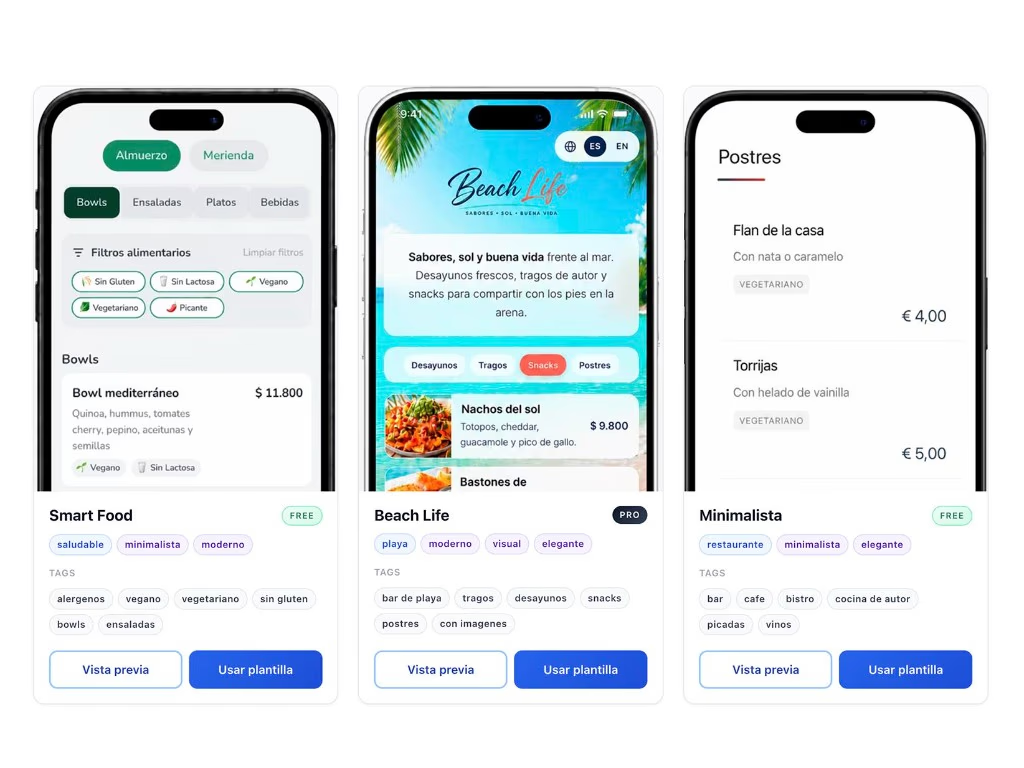
6. Translate the menu with AI and keep prices in sync
If the restaurant receives tourists or guests who speak another language, a menu in several languages can make service much easier.
With a traditional menu, extra languages usually mean translating every product and keeping a separate file for each version.
That becomes a large job when the menu has many products and descriptions.
With App Menu QR you can use AI to translate the menu into the language you need, which cuts the time required for a new version. The feature is Multilingual menu.
Automatic translation can generate product names, categories, and descriptions in the selected language.
You can then review the result and edit any detail, such as dish names, ingredients, or culinary expressions.
You do not have to translate everything from scratch.
There is another important benefit: you change a price once and it updates in every language you have set up.
If the menu is available in Spanish, English, and Italian and a burger price changes, you edit it once in the admin panel.
The new amount appears in all three versions. You do not edit each language separately.
This lets you:
- Translate the menu quickly with AI.
- Review and correct translations when needed.
- Keep prices in sync across languages.
- Avoid different amounts on different versions.
- Manage every language from one place.
- Share every version with a single QR code.
This is especially useful for restaurants in tourist areas, hotels, and venues that receive international visitors.
A centralized multilingual menu improves communication with guests and cuts a large amount of admin work.
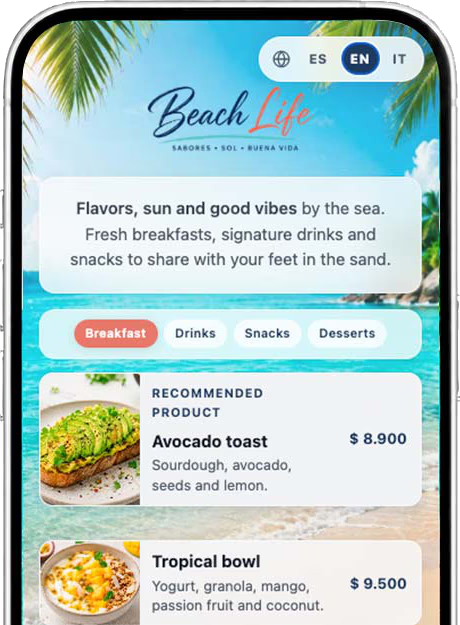
7. Schedule different menus by time of day and special dates
Not every restaurant serves the same products all day, or every day of the week.
A café may serve breakfast in the morning and snacks in the afternoon. A restaurant may have one menu for lunch and another for dinner.
With App Menu QR you can create different menus and schedule when each one is shown, without switching them by hand. The feature is Schedule menus.
Picture this:
A guest arrives in the morning, scans the QR code on the table, and opens the breakfast menu.
Hours later, another guest arrives for dinner. They scan the same QR code and see the dinner menu.
It happens automatically, based on the days and hours you set in advance.
The guest sees the offer for that moment. Staff do not have to explain which menu is active or switch it between services.
For example, you can set:
| Menu | Example schedule |
|---|---|
| Breakfast | Every day, 8:00 to 11:30 |
| Lunch | Every day, 12:00 to 16:00 |
| Dinner | Every day, 19:00 to 23:30 |
| Weekend menu | Saturdays and Sundays |
| Special menu | A specific date, such as Valentine’s Day |
Besides regular hours, you can prepare special menus for particular days, such as celebrations, holidays, promotions, or events.
You can create a Valentine’s Day menu and schedule it so it appears automatically on that date and during those hours.
You do not have to remember when to turn a menu on or off.
App Menu QR shows the right menu automatically, always with the same QR code.
Guests and staff save time, and the restaurant can organize the offer more clearly.
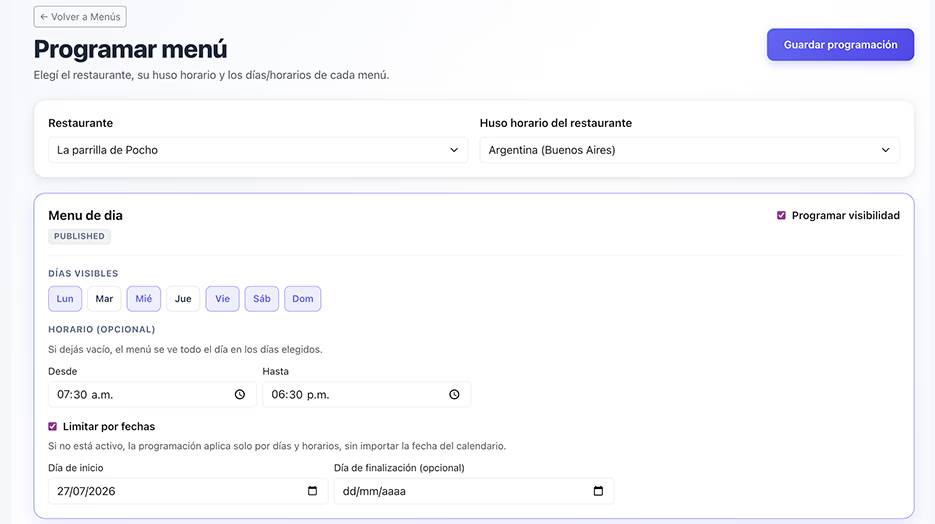
Summary: the main benefits of a dynamic QR menu
If you are considering a digital menu, this table sums up the most important benefits.
| What the restaurant needs | What App Menu QR does |
|---|---|
| Update prices or products | Changes in seconds, in real time, without a third party |
| Spend less on printing | An updatable digital menu, with the option to print |
| Handle sold-out products | Turn products off or on with one click |
| Improve the guest experience | An organized menu adapted to phones |
| Create an attractive menu | Templates and a visual editor, with no design training |
| Offer several languages | AI translation and prices that stay in sync |
| Organize hours and special dates | Scheduled menus that appear automatically |
Which businesses can benefit from a dynamic QR menu?
QR menus are often associated with restaurants, but they also work in other kinds of venues.
Restaurants
They can organize dishes, drinks, desserts, and other categories, and keep product information current.
Bars and cafés
They can present drinks, breakfasts, snacks, and products that change by time of day.
Burger places and quick-service venues
They can show products, descriptions, price variants, and availability.
Hotels and tourist venues
They can present food offers in several languages and make them easy to read on a phone.
Other businesses with price lists
They are also useful for venues that need to organize products and keep commercial information up to date.
Is a dynamic QR menu better than a PDF menu?
Both can share a digital menu, but they offer different ways to manage it.
A PDF can be enough for a business with few products and prices that rarely change.
When you change prices often, manage categories, add products, or customize the presentation, a dedicated platform is usually more practical.
The main difference is that an editable digital menu lets you change products one by one and publish updates instantly, without editing, exporting, and uploading a whole document again.
That does not make a PDF a bad option. The choice depends on what each venue needs.
For a closer look, read QR menu vs. PDF: which is the better option for your restaurant?.
How do you start using a QR menu in your restaurant?
Creating a digital menu does not require coding or design skills.
With App Menu QR you can create an account and build the menu from Dynamic QR menu: the business, the menu, the categories, and the products.
Then you can choose a template, customize the design, and publish the menu so guests can open it.
Once it is set up, the business QR code is in the App Menu QR panel. From there you can preview the menu, open the public link, and download the code to use it in the restaurant. How that code works is in Dynamic QR menu.
If you need help, you can contact the team from Support.
For the full process, these guides help:
- How to create a free QR menu for your restaurant, step by step
- How to generate a QR code for your restaurant menu
They walk through how to create, configure, publish, and print the QR code.
Frequently asked questions about dynamic QR menus
What are the main benefits of a QR menu?
The main benefits are real-time price updates, instant control of sold-out products, less printing, design customization, and an experience adapted to phones. They also let you translate menus with AI, keep prices in sync, and schedule different menus.
Can I change prices without changing the QR code?
Yes. With App Menu QR you can update prices and products from a computer or a phone, without changing the QR code you already shared. The digital menu updates in seconds. See Dynamic QR menu.
Do I need to hire a designer to create my digital menu?
No. App Menu QR lets you build a menu with customizable templates and a visual editor. You can set the layout, colors, and typefaces without coding or graphic-design skills. More detail is in More customization options to design your digital menu.
Can I hide a sold-out product and show it again later?
Yes. From the admin panel you can turn a product off with one click and turn it back on when it is available, without deleting its information. This is covered in Manage products.
Do guests need to download an app?
No. On most current phones, guests can scan the QR code with the camera and open the menu in the browser. How to generate that code is in How to generate a QR code for your restaurant menu.
Can I use a QR menu and a printed menu at the same time?
Yes. Both can work together. App Menu QR can share the menu with a QR code and also generate a print-ready version. See Print menu.
Can I translate my menu automatically with AI?
Yes. App Menu QR can use AI to generate translations into other languages. You can then review and edit the text for dish names, ingredients, or culinary expressions. See Multilingual menu.
What happens to prices if my menu is in several languages?
Prices are managed in one place. When you change a product price, the update appears in every language version, so amounts do not drift apart. See Multilingual menu.
Can I create special menus for specific dates?
Yes. App Menu QR can schedule menus for specific days and hours, such as celebrations, events, or promotions. Once they are set, they appear automatically when they should. See Schedule menus.
Is it possible to create a QR menu for free?
Yes. App Menu QR has a free plan to start creating and sharing a digital menu. You can compare the options on plans and pricing.
Create your QR menu and simplify how you run the restaurant
A dynamic QR menu is not only a screen in place of a traditional menu.
It is a tool to create the menu in a few minutes, update products and prices in real time, and organize the offer without depending on someone else.
With App Menu QR you can create a digital menu, customize the design, and share it with a QR code, while still offering a printed version.
You can also automate menus for different hours, offer the menu in several languages, and keep the information in one place.
When something needs to change, you can do it from a computer or a phone, without waiting for someone else to edit the menu.